VlogMe

Worked example

AI birthday video: one photo wishes Sam a happy birthday

One photo of a woman at her kitchen table with a small cake, and one prompt with the greeting written in quotes. Kling 3.0 Pro brought her to life and spoke all 28 words, so there was no voice track to make first. Here are the prompt, the settings, the credits and what we learned writing for it.

Model
Kling 3.0 ProKuaishou
Price today
216 credits
Output
10.5 s, 720×1280, with sound
Render time
582.7 seconds
Made
VlogMe staff, October 31, 2026

Part of: Make a photo talk

01The exact prompt

Prompt and settings, as the job ran

She sits at the kitchen table beside her small cake and looks warmly into the camera, head level, eyes open, natural blinks. The candle flames flicker softly. One continuous shot, the camera stays still. She says exactly, in English, in a bright, warm woman's voice, at an unhurried, cheerful pace, taking about 10 seconds: "I couldn't be there for your birthday today, so I sent this instead. Eat too much cake, stay up too late, and call me tomorrow. Happy birthday, Sam." Those are the only words, said once, and nothing else is read out. In each pause her lips come gently together. After the last word her lips close into a soft smile and she says nothing more. Quiet room sound only, no music. No subtitles, no on-screen text.

Settings

Workflow
Image to video
Model
Kling 3.0 Pro
Requested length
12 s
Aspect ratio
Same as the input
Negative prompt
subtitles, captions, on-screen text, watermark, logo, music, singing, extra words

02What went in

Inputs, each made in VlogMe

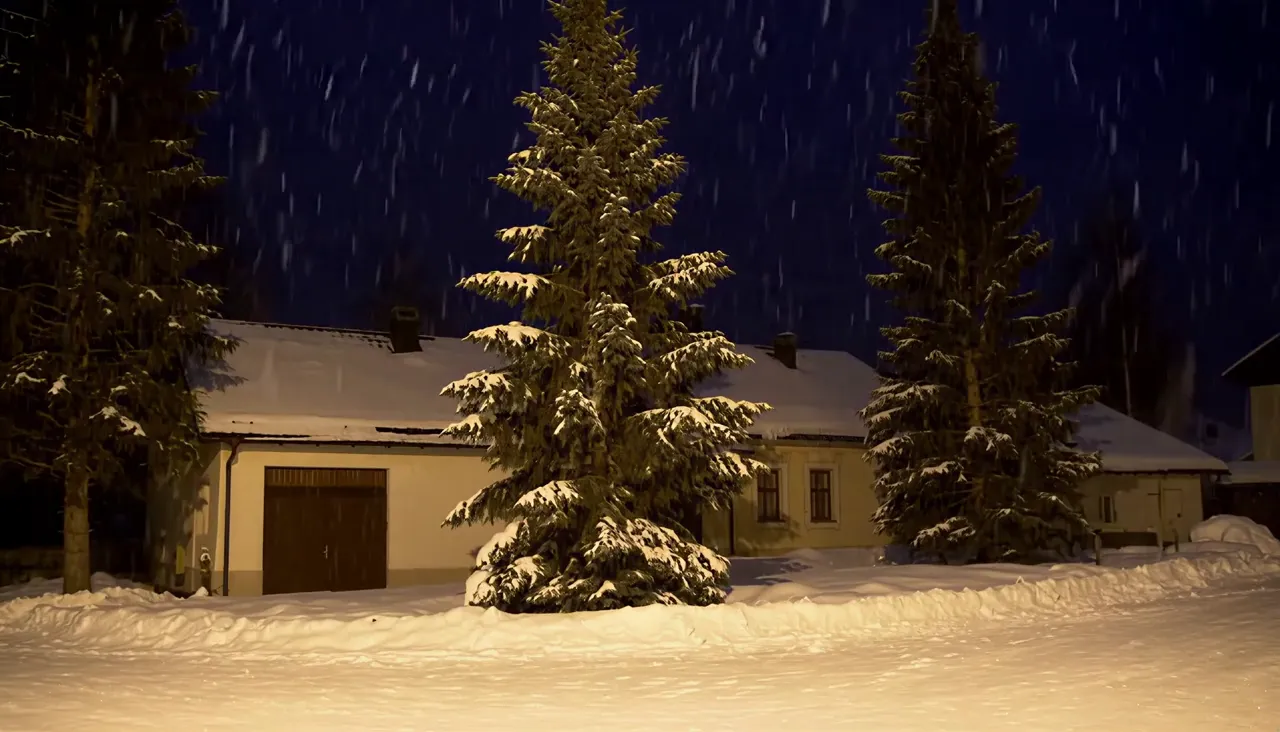
Source still: a woman of about 35 with wavy dark hair and a mustard sweater at a kitchen table, smiling at the camera beside a small cake with four lit candles

Image

Made with Seedream 5.0 Pro (ByteDance)

Its prompt

A cheerful woman of about 35 with shoulder-length wavy dark brown hair, a round face and a mustard sweater, sitting at a kitchen table beside a small homemade cake with lit candles, facing straight to the camera with a warm closed-lip smile, her lips gently together and her mouth fully visible, upper-body framing, natural soft light, shallow depth of field, clean uncluttered background. Fictional adult, a made-up person with a plainly generated look, not a likeness of anyone real. No other people, no visible text, no numbers on the cake, no logos, no brand marks.
Who and what is in it

She is a made-up person: VlogMe staff generated the photo in Image Studio, and no real person's photo or voice went in. A reverse image search on her face named nobody; we dropped one earlier face that it did name.

03What it costs

The same job at today's prices

Today's tariff in credits, from VlogMe's billing code. Plans and credit packs are on the pricing page; to compare models, see the AI Video Price Index.

PartCredits
The video, 12 s with Kling 3.0 Pro202
Image, with Seedream 5.0 Pro14
Total216

04First-hand

What we noticed making it

  • The voice comes from the prompt. The model made it from the written description, “a bright, warm woman's voice”. It is not a library voice or your voice, you do not choose it, and another render may sound different.
  • If you need a chosen voice, you have two routes. On Make a photo talk, add your own recording or a generated voice track to the photo. Or keep a clip like this one and put your voice track over it with AI lip-sync. We tried that on this greeting and her rests stayed. Two things stay from the take as well: the smile through “sent this”, and a mouth that opens a moment before “Eat”. The pass cost 100 credits, and a generated voice track has its own quote. Before the pass, move your track's pauses to match the clip's. Afterwards, lay the clip's room sound under the result, because lip-sync leaves the pauses silent. Any editor can do both, at no cost in credits. The clip shown here keeps the model's voice.
  • Put the words in quotes in the prompt. All 28 of ours came out as written, none added or dropped. They fitted a 12-second render and finished at 10.78 seconds, which left room for the smile at the end. Use that as a yardstick: about 28 words for 12 seconds.
  • Ask for lips to come together in the pauses. Our prompt does, and she rests with her mouth closed after “instead.” and after “tomorrow.”. In our handful of takes a long pause read best after a full stop rather than a comma. That is what we saw, not a rule. She smiles through part of the first sentence; if you want clearer speech there, try asking for less smile.
  • This file is cut. The render ran 12.05 seconds and all of it was billed: 12 seconds, 202 credits, the line in the table. Her mouth opens over a breath before the first word, so we took 0.96 seconds off the start and the quiet tail after 11.45 seconds, which leaves 10.5. Any editor can do this, at no cost in credits.
  • We started this page on a voice track, with Portrait Avatar and OmniHuman 1.5. This line has long silent pauses and their mouths opened in them, so a model that speaks the line itself suited it better. On a voice track, keep the pauses short. Those attempts cost extra and are not in the cost table.

05How to

Make one like it

  1. Start from a front-facing photo with the mouth clearly visible. Ours has a closed-lip smile.
  2. Set Video Studio to Image to video and Kling 3.0 Pro, add the photo and set the length to 12 seconds. The clip keeps the photo's shape.
  3. Write the prompt in this order: the scene, a description of the voice, then the line in quotes. Say those are the only words, and ask for the lips to come together in each pause and close after the last word.
  4. Keep the line short, and end the sentence where you want a long pause.
  5. Trim the start in any editor. If you need a cover image, pick a closed smile rather than the first frame after the trim.

06Recreate this

Start from the same prompt and model

Your own photo goes in the upload box, and this prompt waits in the field under it. Studio opens at a shorter length, so set it to 12 seconds or shorten the line, and copy the negative prompt from the settings above if you want it. Change the words in the quotes and the description of the scene to fit your photo, and keep the lines about the pauses. Allow 10 to 15 minutes for the render.

The voice will be whatever the model makes from your description, so it may not sound like this one. Use a photo of yourself, or of someone who has agreed to it.

This length costs 202 credits today, quoted again before you confirm.